Sunday, February 24, 2019

Storybird

Image result for storybird          Storybird is a storytelling website and app that encourages students to write using text and images. Storybird fosters the love of storytelling and the love of reading stories. It allows students to create authentic work and then actually raise classroom funds by selling this work. They can order their work in print and see their abilities as an artist and storyteller. 

How to use: 
1) Register - All you need to register is a valid e-mail address. Fill in the required information and Storybird will send you a confirmation e-mail. This will start your free trial (15 days). If you wish to use Storybird long-term, it costs $8.99 for a month of membership and $4.99 per month if you prepay for a year. 


2) Under 'You' on the menu for Storybird, you are able to do your own reading and writing. You are able to see your earned badges. You are able to see your favorites on your 'book shelf'. This is very similar to what students will see/will be focused on when they use Storybird. 

3) Under 'classes', teachers are able to create classes. One really cool feature on the classroom portion is that you are able to import class rosters from google classroom if you already use that. It is here that you are able to see your classes and view submissions from students. 

4) Under 'challenges', you are able to access premade content that you can assign to students. It is broken down by unit or skill so that you can find items relevant to your course of study. It also gives the suggested age band for each activity. 

5) Under 'read', you are able to read all kinds of items under the categories of comics, flash fiction, picture book, longform story, and blog. There are featured stories on all kinds of topics. 

6) Under the 'write' section, you are given the same categories of writing to choose from and must start by choosing illustrations for your story. You are able to arrange the image for each slide to have text at the bottom, top, left, or right of the picture. 

Saturday, February 23, 2019

VGo

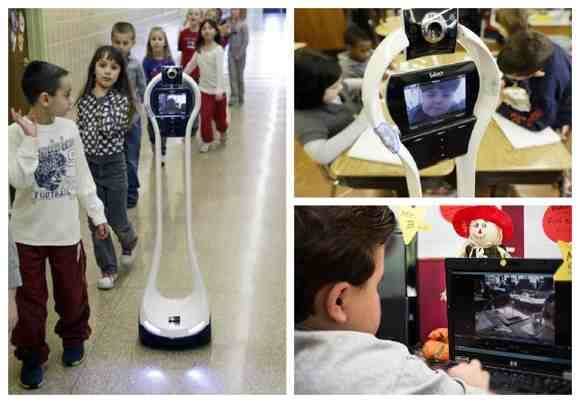
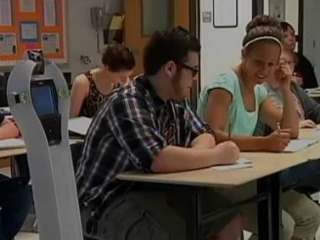
Image result for VGo classroom     What is VGo? - VGo is a fantastic device which allows students to participate in classroom activities even when they are unable to attend school due to chronic or short-term illnesses or disabilities. It is a device that essentially looks like a slender robot with a screen at the top. On that screen, students are able to project themselves via a webcam-esque projection. This device is being used so that students receive the social interaction and full classroom experience from home. This is important for both long-term and short-term homebound students. For short-term students, it is extremely upsetting to experience an injury or illness and be stuck at home (which they are not used to). It makes recovery even more depressing when they can't see their friends. With VGo, these students don't have to feel like their routine has been ruined and can keep a positive attitude which is sure to help them in their recovery. For long-term students, there is a risk that they will never really develop social skills if they are unable to attend classes and have to rely on a homebound teacher coming to their house for a few hours and zero interaction with peers. With VGo, these students can actually have a full school experience. Check out the video below showing VGo's use in a classroom:


     VGo for the Classroom Includes..
1) VGo robot with wifi
2) VGo New Manager (software)
3) Battery (6 hour)
4) Power Cord
5) 1 year hardware warranty
6) Phone and e-mail desk support
7) Reusable Shipping Box

Image result for vgo in the classroomIs it feasible? - From what I have gathered, the VGo for the classroom costs about 6 or 7 thousand dollars and requires about $1,200 for yearly maintenance. For convenience, it is beneficial to upgrade to a 12 hour battery for an extra $200. It must be charged daily and there are software updates. I would also highly suggest not allowing a student to 'walk to class' in a crowded secondary school hallway for sake of taking care of the VGo. The feasibility of the VGo really depends on its purpose and its lifespan. I cannot find any information for how long the VGo usually holds up. If for many years, it could definitely be worth it, but I wonder if this is the case. As far as cost for home-bound services, it really depends on the school's policy on home-bound. A school can send a teacher out for as little as 5 hours per week at the secondary level. Let's say that the school does the bare minimum and pays the teacher $25 per hour. This would only cost $125 per week. There is no way that short-term home-bound student cost would come close to the cost of a VGo. If a school knows that they will have a long-term home-bound student for multiple years and the VGo lasts for several years, then it would be financially sound to do such a thing. It really all depends on your funding sources and attitudes of your board members. When I become principal, I would love to look out for my students and offer such an awesome classroom experience for students who otherwise wouldn't have a chance to interact with their peers. However, I realize the financial constraints that exist and I can only hope that VGo becomes more affordable in the future.

Friday, February 22, 2019

RealSense Technology

Image result for intel     The detail and complexity level at which technology can operate is mind-blowing. Intel demonstrates this in their RealSense Technology line. They are creating technology that allows for 3d recognition and creation of cameras that can recognize gestures and make decisions based on stimuli. RealSense has changed the game for all companies, but especially video games and interactive storytelling. Intel has created devices 'smarter' than I ever imagined could be possible.

Image result for realsense 3d imageImages - RealSense Technology has enhanced how images can be taken and processed. Prior to recent technology, a picture is two dimensional and can be edited only with the traditional photo shop changes (color, removing items from a picture, adding items to a picture, etc. With RealSense, cameras can now gain more 3D imagery with depth that can be produced on a picture. No longer is a picture flat, but RealSense cameras can take in the 'full picture' where the image produced can be rotated or viewer moved to see the 3D elements of the image.

Gesture Control - With RealSense, gestures can be recognized which essentially allows interaction between the user and technology. Long gone are the days of just using mouses. You can now give signals to computers by the wave of a hand. You can move objects on the screen. You can scroll or swipe. There are many signals that can be given to the computer. Please enjoy the video below displaying gesture control by Intel RealSense created by youtube user David Brebner:


In addition to gesture recognition, RealSense has also enhanced the recognition of facial features for face recognition.

Video - Instead of video being just a plain representation of what is seen, RealSense creates the camera and software to create a digital representation of the environment recorded. They also have technology to add elements to an area which is great for augmented reality. You have a digital record with additional items that you can add to the existing environment. Please enjoy the video below of youtube user khaled waly as he demonstrates use of RealSense R200 Augmented Reality:


Scanning 3D Images - With RealSense technology, users can create three dimensional images by scanning an object. They then are able to edit that image. Imagine with a 3D printer, some of the awesome things that you could do with RealSense technology. It is amazing the level of detail the scanned images produce and how precise the changes that you can make really are. Please enjoy the video below created by youtube user Farnam Adelkhani on 3D Scanning with the Intel RealSense D415:


Collaborating - RealSense Technology can foster collaboration through 3D imaging, speech recognition, gesture recognition, and face recognition. You essentially can have office meetings without being there and be able to show technological development while doing it. You can display yourself interacting digitally to demonstrate things. How detailed can office instructional videos now be. For teachers and students, presentations can be amazing and shared videos/images are more detailed and can be edited in more creative ways.